PowerShell – Password vault

Something with 256 AES encryption to help locally manage passwords with ability to copy to the clipboard for pasting.
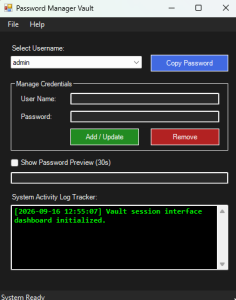
Here is the code
# Ensure STA mode for Windows Forms and Clipboard operations
# Declare explicit requirements for GUI and Speech
Add-Type -AssemblyName System.Windows.Forms
Add-Type -AssemblyName System.Drawing
Add-Type -AssemblyName System.Speech

# --- Configuration & Paths ---
$LogDir = "C:\logs"
$PasswordFile = Join-Path $PSScriptRoot "passwords.txt"
if (-not (Test-Path $PasswordFile)) {
    New-Item -ItemType File -Path $PasswordFile -Force | Out-Null
    Set-Content -Path $PasswordFile -Value "admin.Password123`nuser1.SecurePass!@#"
}

# --- Initialization & State Variables ---
$Script:PasswordMap = @{}
$Script:ClipboardTimer = New-Object System.Windows.Forms.Timer
$Script:PreviewTimer = New-Object System.Windows.Forms.Timer

# --- Helper Functions ---
function Write-Log {
    param (
        [string]$Message,
        [string]$Username = "System"
    )
    $CurrentDate = Get-Date -Format "yyyy-MM-dd"
    $CurrentTime = Get-Date -Format "HH:mm:ss"
    $TargetFolder = Join-Path $LogDir $CurrentDate

    if (-not (Test-Path $TargetFolder)) {
        New-Item -ItemType Directory -Path $TargetFolder -Force | Out-Null
    }

    $LogFile = Join-Path $TargetFolder "$Username.txt"
    $LogEntry = "[$CurrentDate $CurrentTime] $Message"

    try {
        Add-Content -Path $LogFile -Value $LogEntry -ErrorAction SilentlyContinue
    } catch {}

    # Update UI Event Box if available
    if ($TxtEventLog) {
        $TxtEventLog.AppendText("$LogEntry`r`n")
        $TxtEventLog.SelectionStart = $TxtEventLog.TextLength
        $TxtEventLog.ScrollToCaret()
    }
}

function Load-Passwords {
    $Script:PasswordMap.Clear()
    if (Test-Path $PasswordFile) {
        Get-Content $PasswordFile | ForEach-Object {
            if ($_ -match "(.+?)\.\s*(.+)") {
                $User = $Matches[1].Trim()
                $Pass = $Matches[2].Trim()
                $Script:PasswordMap[$User] = $Pass
            }
        }
    }

    # Refresh ComboBox
    $CboUsers.Items.Clear()
    foreach ($User in $Script:PasswordMap.Keys) {
        $CboUsers.Items.Add($User) | Out-Null
    }
    if ($CboUsers.Items.Count -gt 0) { $CboUsers.SelectedIndex = 0 }
}

function Save-Passwords {
    $Lines = @()
    foreach ($User in $Script:PasswordMap.Keys) {
        $Lines += "$User. $($Script:PasswordMap[$User])"
    }
    Set-Content -Path $PasswordFile -Value $Lines -Force
}

function Play-VoiceGreeting {
    try {
        $Synth = New-Object System.Speech.Synthesis.SpeechSynthesizer
        $FemaleVoice = $Synth.GetInstalledVoices() | Where-Object { $_.VoiceInfo.Gender -eq 'Female' } | Select-Object -First 1
        if ($FemaleVoice) { $Synth.SelectVoice($FemaleVoice.VoiceInfo.Name) }

        $Hour = (Get-Date).Hour
        $GreetingTime = "Good Evening"
        if ($Hour -lt 12) { $GreetingTime = "Good Morning" }
        elseif ($Hour -lt 18) { $GreetingTime = "Good Afternoon" }

        $CurrentUser = [Environment]::UserName
        $CurrentTimeStr = Get-Date -Format "hh:mm tt"

        $SpeechText = "$GreetingTime $CurrentUser. The current time is $CurrentTimeStr."
        $Synth.SpeakAsync($SpeechText) | Out-Null
    } catch {}
}

# --- GUI Build Framework ---
$MainForm = New-Object System.Windows.Forms.Form
$MainForm.Text = "Password Manager Vault"
$MainForm.Size = New-Object System.Drawing.Size(420, 520)
$MainForm.StartPosition = [System.Windows.Forms.FormStartPosition]::Manual

# Screen Position: Top Right
$Screen = [System.Windows.Forms.Screen]::PrimaryScreen.WorkingArea
$MainForm.Location = New-Object System.Drawing.Point(($Screen.Width - $MainForm.Width - 20), 40)

# Styling Parameters (Dark Mode & Cyber Accent)
$BgColor = [System.Drawing.Color]::FromArgb(28, 28, 28)
$FgColor = [System.Drawing.Color]::FromArgb(240, 240, 240)
$PanelBg = [System.Drawing.Color]::FromArgb(40, 40, 40)
$LimeGreen = [System.Drawing.Color]::LimeGreen
$BtnText = [System.Drawing.Color]::White

$MainForm.BackColor = $BgColor
$MainForm.ForeColor = $FgColor

# Menu Configuration
$MainMenu = New-Object System.Windows.Forms.MenuStrip
$MainMenu.BackColor = $PanelBg
$MainMenu.ForeColor = $FgColor

$FileMenu = New-Object System.Windows.Forms.ToolStripMenuItem("File")
$FileMenu.ForeColor = $FgColor
$ExitItem = New-Object System.Windows.Forms.ToolStripMenuItem("Exit")
$ExitItem.Add_Click({ $MainForm.Close() })
$FileMenu.DropDownItems.Add($ExitItem) | Out-Null

$HelpMenu = New-Object System.Windows.Forms.ToolStripMenuItem("Help")
$HelpMenu.ForeColor = $FgColor
$AboutItem = New-Object System.Windows.Forms.ToolStripMenuItem("About")
$AboutItem.Add_Click({
    [System.Windows.Forms.MessageBox]::Show("Password Manager GUI v1.0`r`nSecure local storage automation script.", "About")
})
$HelpMenu.DropDownItems.Add($AboutItem) | Out-Null

$MainMenu.Items.Add($FileMenu) | Out-Null
$MainMenu.Items.Add($HelpMenu) | Out-Null
$MainForm.MainMenuStrip = $MainMenu
$MainForm.Controls.Add($MainMenu)

# Control Elements Creation
$LblUserDropdown = New-Object System.Windows.Forms.Label
$LblUserDropdown.Text = "Select Username:"
$LblUserDropdown.Location = New-Object System.Drawing.Point(20, 45)
$LblUserDropdown.Size = New-Object System.Drawing.Size(150, 20)
$MainForm.Controls.Add($LblUserDropdown)

$CboUsers = New-Object System.Windows.Forms.ComboBox
$CboUsers.Location = New-Object System.Drawing.Point(20, 65)
$CboUsers.Size = New-Object System.Drawing.Size(220, 25)
$CboUsers.BackColor = $PanelBg
$CboUsers.ForeColor = $FgColor
$CboUsers.DropDownStyle = [System.Windows.Forms.ComboBoxStyle]::DropDownList
$MainForm.Controls.Add($CboUsers)

$BtnCopy = New-Object System.Windows.Forms.Button
$BtnCopy.Text = "Copy Password"
$BtnCopy.Location = New-Object System.Drawing.Point(255, 63)
$BtnCopy.Size = New-Object System.Drawing.Size(130, 28)
$BtnCopy.BackColor = [System.Drawing.Color]::RoyalBlue
$BtnCopy.ForeColor = $BtnText
$BtnCopy.FlatStyle = [System.Windows.Forms.FlatStyle]::Flat
$MainForm.Controls.Add($BtnCopy)

# Divider line
$FrameManage = New-Object System.Windows.Forms.GroupBox
$FrameManage.Text = "Manage Credentials"
$FrameManage.Location = New-Object System.Drawing.Point(20, 105)
$FrameManage.Size = New-Object System.Drawing.Size(365, 120)
$FrameManage.ForeColor = $FgColor

$LblInputUser = New-Object System.Windows.Forms.Label
$LblInputUser.Text = "User Name:"
$LblInputUser.Location = New-Object System.Drawing.Point(15, 25)
$LblInputUser.Size = New-Object System.Drawing.Size(80, 20)
$FrameManage.Controls.Add($LblInputUser)

$TxtInputUser = New-Object System.Windows.Forms.TextBox
$TxtInputUser.Location = New-Object System.Drawing.Point(100, 22)
$TxtInputUser.Size = New-Object System.Drawing.Size(250, 22)
$TxtInputUser.BackColor = $PanelBg
$TxtInputUser.ForeColor = $FgColor
$FrameManage.Controls.Add($TxtInputUser)

$LblInputPass = New-Object System.Windows.Forms.Label
$LblInputPass.Text = "Password:"
$LblInputPass.Location = New-Object System.Drawing.Point(15, 55)
$LblInputPass.Size = New-Object System.Drawing.Size(80, 20)
$FrameManage.Controls.Add($LblInputPass)

$TxtInputPass = New-Object System.Windows.Forms.TextBox
$TxtInputPass.Location = New-Object System.Drawing.Point(100, 52)
$TxtInputPass.Size = New-Object System.Drawing.Size(250, 22)
$TxtInputPass.BackColor = $PanelBg
$TxtInputPass.ForeColor = $FgColor
$TxtInputPass.UseSystemPasswordChar = $true
$FrameManage.Controls.Add($TxtInputPass)

$BtnAddUpdate = New-Object System.Windows.Forms.Button
$BtnAddUpdate.Text = "Add / Update"
$BtnAddUpdate.Location = New-Object System.Drawing.Point(100, 82)
$BtnAddUpdate.Size = New-Object System.Drawing.Size(115, 28)
$BtnAddUpdate.BackColor = [System.Drawing.Color]::ForestGreen
$BtnAddUpdate.ForeColor = $BtnText
$BtnAddUpdate.FlatStyle = [System.Windows.Forms.FlatStyle]::Flat
$FrameManage.Controls.Add($BtnAddUpdate)

$BtnRemove = New-Object System.Windows.Forms.Button
$BtnRemove.Text = "Remove"
$BtnRemove.Location = New-Object System.Drawing.Point(235, 82)
$BtnRemove.Size = New-Object System.Drawing.Size(115, 28)
$BtnRemove.BackColor = [System.Drawing.Color]::Firebrick
$BtnRemove.ForeColor = $BtnText
$BtnRemove.FlatStyle = [System.Windows.Forms.FlatStyle]::Flat
$FrameManage.Controls.Add($BtnRemove)

$MainForm.Controls.Add($FrameManage)

# Preview Block
$ChkShowPass = New-Object System.Windows.Forms.CheckBox
$ChkShowPass.Text = "Show Password Preview (30s)"
$ChkShowPass.Location = New-Object System.Drawing.Point(20, 235)
$ChkShowPass.Size = New-Object System.Drawing.Size(220, 20)
$MainForm.Controls.Add($ChkShowPass)

$TxtPreview = New-Object System.Windows.Forms.TextBox
$TxtPreview.Location = New-Object System.Drawing.Point(20, 260)
$TxtPreview.Size = New-Object System.Drawing.Size(365, 22)
$TxtPreview.BackColor = $PanelBg
$TxtPreview.ForeColor = $FgColor
$TxtPreview.ReadOnly = $true
$MainForm.Controls.Add($TxtPreview)

# Terminal Event Display
$LblEvents = New-Object System.Windows.Forms.Label
$LblEvents.Text = "System Activity Log Tracker:"
$LblEvents.Location = New-Object System.Drawing.Point(20, 295)
$LblEvents.Size = New-Object System.Drawing.Size(200, 20)
$MainForm.Controls.Add($LblEvents)

$TxtEventLog = New-Object System.Windows.Forms.TextBox
$TxtEventLog.Multiline = $true
$TxtEventLog.ReadOnly = $true
$TxtEventLog.Location = New-Object System.Drawing.Point(20, 315)
$TxtEventLog.Size = New-Object System.Drawing.Size(365, 110)
$TxtEventLog.BackColor = [System.Drawing.Color]::Black
# Create a proper Bold font using a clean font family (like Consolas or Arial)
$TxtEventLog.Font = New-Object System.Drawing.Font("Consolas", 10, [System.Drawing.FontStyle]::Bold)
$TxtEventLog.ForeColor = [System.Drawing.Color]::Lime

$TxtEventLog.Font = New-Object System.Drawing.Font("Consolas", 9.5, [System.Drawing.FontStyle]::Bold)
$TxtEventLog.ScrollBars = [System.Windows.Forms.ScrollBars]::Vertical
$MainForm.Controls.Add($TxtEventLog)

# Operational Status Strip
$StatusStrip = New-Object System.Windows.Forms.StatusStrip
$StatusStrip.BackColor = $PanelBg
$StatusStrip.ForeColor = $FgColor
$StatusLabel = New-Object System.Windows.Forms.ToolStripStatusLabel
$StatusLabel.Text = "System Ready"
$StatusStrip.Items.Add($StatusLabel) | Out-Null
$MainForm.Controls.Add($StatusStrip)

# --- Timing Engine Configurations ---
$Script:ClipboardCounter = 0
$ClipboardTimer.Interval = 1000
$ClipboardTimer.Add_Tick({
    if ($Script:ClipboardCounter -gt 0) {
        $Script:ClipboardCounter--
        $StatusLabel.Text = "Clipboard clears in: $($Script:ClipboardCounter) seconds"
        if ($Script:ClipboardCounter -eq 0) {
            [System.Windows.Forms.Clipboard]::Clear()
            $StatusLabel.Text = "Clipboard security wiped clean."
            $ClipboardTimer.Stop()
        }
    }
})

$Script:PreviewCounter = 0
$PreviewTimer.Interval = 1000
$PreviewTimer.Add_Tick({
    if ($Script:PreviewCounter -gt 0) {
        $Script:PreviewCounter--
        if ($Script:PreviewCounter -eq 0) {
            $ChkShowPass.Checked = $false
            $TxtPreview.Text = ""
            $PreviewTimer.Stop()
        }
    }
})

# --- Event Callback Logics ---

$CboUsers.Add_SelectedIndexChanged({
    if ($ChkShowPass.Checked) {
        $ChkShowPass.Checked = $false
        $TxtPreview.Text = ""
    }
})

$BtnCopy.Add_Click({
    $SelectedUser = $CboUsers.SelectedItem
    if ($SelectedUser -and $Script:PasswordMap.ContainsKey($SelectedUser)) {
        $Pass = $Script:PasswordMap[$SelectedUser]
        [System.Windows.Forms.Clipboard]::SetText($Pass)

        Write-Log -Message "Password copied to clipboard safely." -Username $SelectedUser

        $Script:ClipboardCounter = 60
        $StatusLabel.Text = "Clipboard clears in: 60 seconds"
        $ClipboardTimer.Start()
    }
})

$ChkShowPass.Add_CheckedChanged({
    if ($ChkShowPass.Checked) {
        $SelectedUser = $CboUsers.SelectedItem
        if ($SelectedUser -and $Script:PasswordMap.ContainsKey($SelectedUser)) {
            $TxtPreview.Text = $Script:PasswordMap[$SelectedUser]
            $Script:PreviewCounter = 30
            $PreviewTimer.Start()
        } else {
            $ChkShowPass.Checked = $false
        }
    } else {
        $TxtPreview.Text = ""
        $PreviewTimer.Stop()
    }
})

$BtnAddUpdate.Add_Click({
    $User = $TxtInputUser.Text.Trim()
    $Pass = $TxtInputPass.Text.Trim()

    if ([string]::IsNullOrEmpty($User) -or [string]::IsNullOrEmpty($Pass)) {
        [System.Windows.Forms.MessageBox]::Show("Fields cannot be blank.", "Input Error")
        return
    }

    $Action = if ($Script:PasswordMap.ContainsKey($User)) { "Updated" } else { "Added" }
    $Script:PasswordMap[$User] = $Pass
    Save-Passwords
    Load-Passwords

    Write-Log -Message "Account tracking schema credential $Action." -Username $User

    # Hide tracking payload security masking fields clear
    $TxtInputUser.Text = ""
    $TxtInputPass.Text = ""
})

$BtnRemove.Add_Click({
    $User = $TxtInputUser.Text.Trim()
    if ([string]::IsNullOrEmpty($User)) {
        $User = $CboUsers.SelectedItem
    }

    if ($User -and $Script:PasswordMap.ContainsKey($User)) {
        $Script:PasswordMap.Remove($User)
        Save-Passwords
        Load-Passwords
        Write-Log -Message "Account credential records dropped from profile registry storage structure safely." -Username $User
        $TxtInputUser.Text = ""
        $TxtInputPass.Text = ""
    } else {
        [System.Windows.Forms.MessageBox]::Show("Specified username profile not registered.", "Error Context Handling")
    }
})

# --- Lifecycle Hooks ---
$MainForm.Add_Load({
    Write-Log -Message "Vault session interface dashboard initialized." -Username "Session"
    Load-Passwords
    Play-VoiceGreeting
})

$MainForm.Add_FormClosing({
    $ClipboardTimer.Stop()
    $PreviewTimer.Stop()
    [System.Windows.Forms.Clipboard]::Clear()
    Write-Log -Message "Vault session interface context dropped securely. Exited." -Username "Session"
})

# Launch application thread
[System.Windows.Forms.Application]::Run($MainForm)