PowerShell – Enterprise-style PowerShell 5.1 GUI for browser link management.

Something I thought that might help with link management
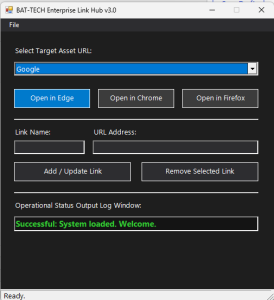
– Audio greetings with female voice, user, and date context.
– Extensive logging to C:\logs\PASS\<yyyyMMDD>\Pass_yyyyMMDD.log.
– Advanced try/catch error handling.
– Dark mode Windows Form with menu bar, status bar, and custom controls.
– Multi-browser support (Edge, Chrome, Firefox).
– Inline GUI layout to directly add or remove text file items dynamically.
Here is the code, still a work in progress but it does work.
<#
.SYNOPSIS
    Enterprise-style PowerShell 5.1 GUI for browser link management.
.DESCRIPTION
    - Audio greetings with female voice, user, and date context.
    - Extensive logging to C:\logs\PASS\<yyyyMMDD>\Pass_yyyyMMDD.log.
    - Advanced try/catch error handling.
    - Dark mode Windows Form with menu bar, status bar, and custom controls.
    - Multi-browser support (Edge, Chrome, Firefox).
    - Inline GUI layout to directly add or remove text file items dynamically.
.NOTES
    Requires Administrator privileges.
    Target: PowerShell 5.1 on Windows.
#>

# Ensure script runs as Administrator
if (-not ([Security.Principal.WindowsPrincipal][Security.Principal.WindowsIdentity]::GetCurrent()).IsInRole([Security.Principal.WindowsBuiltInRole]::Administrator)) {
    Write-Warning "This script must be run as an Administrator."
    Exit
}

# --- Configuration & Global Variables ---
$Script:LogDir   = "C:\logs\PASS\$(Get-Date -Format 'yyyyMMDD')"
$Script:LogFile  = Join-Path $Script:LogDir "Pass_$(Get-Date -Format 'yyyyMMDD').log"
$Script:LinksDir = ".\list"
$Script:LinksFile = Join-Path $Script:LinksDir "links.txt"
$Script:LinkDictionary = [System.Collections.Generic.Dictionary[string, string]]::new()

# --- Assembly Loading ---
Add-Type -AssemblyName System.Windows.Forms
Add-Type -AssemblyName System.Drawing
Add-Type -AssemblyName System.Speech

# --- Logging Engine ---
Function Write-Log {
    Param (
        [Parameter(Mandatory=$true)][String]$Message,
        [Parameter(Mandatory=$false)][ValidateSet("INFO", "WARN", "ERROR")][String]$Level = "INFO"
    )
    Try {
        if (-not (Test-Path $Script:LogDir)) {
            New-Item -ItemType Directory -Path $Script:LogDir -Force | Out-Null
        }
        $Timestamp = Get-Date -Format "yyyy-MM-dd HH:mm:ss"
        $LogLine = "[$Timestamp] [$Level] $Message"
        Add-Content -Path $Script:LogFile -Value $LogLine -ErrorAction Stop
    }
    Catch {
        Write-Error "Failed to write to log file: $_"
    }
}

# --- Audio Engine (Configured for Female Voice) ---
Function Invoke-VoiceGreeting {
    Param ([Parameter(Mandatory=$true)][String]$Type)
    Try {
        $Synth = New-Object System.Speech.Synthesis.SpeechSynthesizer

        # Explicitly search for and select an installed female voice profile
        Try {
            $Synth.SelectVoiceByHints([System.Speech.Synthesis.VoiceGender]::Female)
        }
        Catch {
            Write-Log "Requested female voice profile not found. Using system standard voice instead." "WARN"
        }

        $User = [Environment]::UserName
        $DateString = Get-Date -Format "dddd, MMMM d, yyyy"
        $TimeString = Get-Date -Format "h:mm tt"

        if ($Type -eq "Start") {
            $Text = "Welcome $User. Today is $DateString, and the current time is $TimeString. BAT-TECH-LINKS Starting."
        } else {
            $Text = "Goodbye $User. Session ending on $DateString at $TimeString. Updating logs and closing application."
        }
        $Synth.Speak($Text)
    }
    Catch {
        Write-Log "Voice synthesis completely failed: $_" "WARN"
    }
}

# --- UI Helper Engines ---
Function Update-Status {
    Param (
        [Parameter(Mandatory=$true)][String]$Text,
        [Parameter(Mandatory=$true)][Boolean]$IsError
    )
    $StatusTextBox.Text = $Text
    if ($IsError) {
        $StatusTextBox.ForeColor = [System.Drawing.Color]::Red
        $StatusLabel.Text = " Error occurred."
    } else {
        $StatusTextBox.ForeColor = [System.Drawing.Color]::LimeGreen
        $StatusLabel.Text = " Ready."
    }
}

# --- File/Data Management Engine ---
Function Load-LinksFile {
    Try {
        if (-not (Test-Path $Script:LinksDir)) {
            New-Item -ItemType Directory -Path $Script:LinksDir -Force | Out-Null
        }
        if (-not (Test-Path $Script:LinksFile)) {
            New-Item -ItemType File -Path $Script:LinksFile -Force | Out-Null
            Add-Content -Path $Script:LinksFile -Value "Google,https://google.com"
        }

        $Script:LinkDictionary.Clear()
        $Dropdown.Items.Clear()

        $Lines = Get-Content -Path $Script:LinksFile
        foreach ($Line in $Lines) {
            if ($Line -match "^([^,]+),(.+)$") {
                $Name = $Matches[1].Trim()
                $Url = $Matches[2].Trim()
                if (-not $Script:LinkDictionary.ContainsKey($Name)) {
                    $Script:LinkDictionary.Add($Name, $Url)
                    [void]$Dropdown.Items.Add($Name)
                }
            }
        }
        if ($Dropdown.Items.Count -gt 0) {
            $Dropdown.SelectedIndex = 0
        } else {
            $Dropdown.Text = ""
        }
        Write-Log "Successfully loaded $($Script:LinkDictionary.Count) links from flat file." "INFO"
    }
    Catch {
        Write-Log "Error processing links file: $_" "ERROR"
    }
}

Function Save-LinksFile {
    Try {
        $Lines = @()
        foreach ($Key in $Script:LinkDictionary.Keys) {
            $Lines += "$Key,$($Script:LinkDictionary[$Key])"
        }
        Set-Content -Path $Script:LinksFile -Value $Lines -ErrorAction Stop
        Write-Log "Flat database synchronized successfully." "INFO"
    }
    Catch {
        Write-Log "Failed saving data to flat file: $_" "ERROR"
        Update-Status "Failed: Database file save error." $true
    }
}

# --- Browser Launch Engine ---
Function Launch-Browser {
    Param (
        [Parameter(Mandatory=$true)][String]$BrowserExe,
        [Parameter(Mandatory=$true)][String]$BrowserName
    )
    $SelectedName = $Dropdown.SelectedItem
    if ([string]::IsNullOrEmpty($SelectedName)) {
        Update-Status "Failed: No link item selected." $true
        Return
    }

    Try {
        $Url = $Script:LinkDictionary[$SelectedName]
        Write-Log "Attempting to launch $BrowserName to $Url" "INFO"

        $Process = Start-Process $BrowserExe -ArgumentList $Url -PassThru -ErrorAction Stop
        Update-Status "Successful: Opened $SelectedName in $BrowserName." $false
        Write-Log "Successfully launched $BrowserName (PID: $($Process.Id))" "INFO"
    }
    Catch {
        $ErrorMsg = "Failed to launch $BrowserName. Verify browser installation."
        Update-Status "Failed: See log for details." $true
        Write-Log "$ErrorMsg Details: $_" "ERROR"
    }
}

# --- Initialization & Form Layout (Dark Mode) ---
Write-Log "Initializing Application GUI Framework..." "INFO"
Invoke-VoiceGreeting "Start"

$Form = New-Object System.Windows.Forms.Form
$Form.Text = "BAT-TECH Enterprise Link Hub v3.0"
$Form.Size = New-Object System.Drawing.Size(520, 560)
$Form.StartPosition = "CenterScreen"
$Form.BackColor = [System.Drawing.Color]::FromArgb(30, 30, 30)
$Form.ForeColor = [System.Drawing.Color]::White
$Form.Font = New-Object System.Drawing.Font("Segoe UI", 10)
$Form.FormBorderStyle = "FixedSingle"
$Form.MaximizeBox = $false

# Font Templates
$FontStatus = New-Object System.Drawing.Font("Segoe UI", 11, [System.Drawing.FontStyle]::Bold)

# 1. Menu Bar
$MenuStrip = New-Object System.Windows.Forms.MenuStrip
$MenuStrip.BackColor = [System.Drawing.Color]::FromArgb(45, 45, 48)
$MenuStrip.ForeColor = [System.Drawing.Color]::White

$FileMenu = New-Object System.Windows.Forms.ToolStripMenuItem("File")
$FileMenu.ForeColor = [System.Drawing.Color]::White
$ExitMenuItem = New-Object System.Windows.Forms.ToolStripMenuItem("Exit")
$ExitMenuItem.ForeColor = [System.Drawing.Color]::Black
$ExitMenuItem.Add_Click({ $Form.Close() })
[void]$FileMenu.DropDownItems.Add($ExitMenuItem)
[void]$MenuStrip.Items.Add($FileMenu)
$Form.MainMenuStrip = $MenuStrip
$Form.Controls.Add($MenuStrip)

# 2. Main Label
$DropdownLabel = New-Object System.Windows.Forms.Label
$DropdownLabel.Text = "Select Target Asset URL:"
$DropdownLabel.Location = New-Object System.Drawing.Point(25, 50)
$DropdownLabel.Size = New-Object System.Drawing.Size(200, 25)
$Form.Controls.Add($DropdownLabel)

# 3. Dropdown Box
$Dropdown = New-Object System.Windows.Forms.ComboBox
$Dropdown.Location = New-Object System.Drawing.Point(25, 80)
$Dropdown.Size = New-Object System.Drawing.Size(450, 30)
$Dropdown.DropDownStyle = [System.Windows.Forms.ComboBoxStyle]::DropDownList
$Dropdown.BackColor = [System.Drawing.Color]::FromArgb(45, 45, 48)
$Dropdown.ForeColor = [System.Drawing.Color]::White
$Form.Controls.Add($Dropdown)

# 4. Action Buttons (Browser Launchers)
$BtnEdge = New-Object System.Windows.Forms.Button
$BtnEdge.Text = "Open in Edge"
$BtnEdge.Location = New-Object System.Drawing.Point(25, 130)
$BtnEdge.Size = New-Object System.Drawing.Size(140, 35)
$BtnEdge.BackColor = [System.Drawing.Color]::FromArgb(0, 122, 204)
$BtnEdge.FlatStyle = "Flat"
$BtnEdge.Add_Click({ Launch-Browser "msedge.exe" "Microsoft Edge" })
$Form.Controls.Add($BtnEdge)

$BtnChrome = New-Object System.Windows.Forms.Button
$BtnChrome.Text = "Open in Chrome"
$BtnChrome.Location = New-Object System.Drawing.Point(180, 130)
$BtnChrome.Size = New-Object System.Drawing.Size(140, 35)
$BtnChrome.BackColor = [System.Drawing.Color]::FromArgb(60, 60, 60)
$BtnChrome.FlatStyle = "Flat"
$BtnChrome.Add_Click({ Launch-Browser "chrome.exe" "Google Chrome" })
$Form.Controls.Add($BtnChrome)

$BtnFirefox = New-Object System.Windows.Forms.Button
$BtnFirefox.Text = "Open in Firefox"
$BtnFirefox.Location = New-Object System.Drawing.Point(335, 130)
$BtnFirefox.Size = New-Object System.Drawing.Size(140, 35)
$BtnFirefox.BackColor = [System.Drawing.Color]::FromArgb(60, 60, 60)
$BtnFirefox.FlatStyle = "Flat"
$BtnFirefox.Add_Click({ Launch-Browser "firefox.exe" "Mozilla Firefox" })
$Form.Controls.Add($BtnFirefox)

# Divider Line
$Divider = New-Object System.Windows.Forms.Label
$Divider.Location = New-Object System.Drawing.Point(25, 185)
$Divider.Size = New-Object System.Drawing.Size(450, 2)
$Divider.BorderStyle = "Fixed3D"
$Form.Controls.Add($Divider)

# 5. File Management Actions (Inline UI Controls)
$TxtNameLabel = New-Object System.Windows.Forms.Label
$TxtNameLabel.Text = "Link Name:"
$TxtNameLabel.Location = New-Object System.Drawing.Point(25, 200)
$TxtNameLabel.Size = New-Object System.Drawing.Size(100, 20)
$Form.Controls.Add($TxtNameLabel)

$TxtName = New-Object System.Windows.Forms.TextBox
$TxtName.Location = New-Object System.Drawing.Point(25, 225)
$TxtName.Size = New-Object System.Drawing.Size(130, 25)
$TxtName.BackColor = [System.Drawing.Color]::FromArgb(45, 45, 48)
$TxtName.ForeColor = [System.Drawing.Color]::White
$Form.Controls.Add($TxtName)

$TxtUrlLabel = New-Object System.Windows.Forms.Label
$TxtUrlLabel.Text = "URL Address:"
$TxtUrlLabel.Location = New-Object System.Drawing.Point(170, 200)
$TxtUrlLabel.Size = New-Object System.Drawing.Size(100, 20)
$Form.Controls.Add($TxtUrlLabel)

$TxtUrl = New-Object System.Windows.Forms.TextBox
$TxtUrl.Location = New-Object System.Drawing.Point(170, 225)
$TxtUrl.Size = New-Object System.Drawing.Size(305, 25)
$TxtUrl.BackColor = [System.Drawing.Color]::FromArgb(45, 45, 48)
$TxtUrl.ForeColor = [System.Drawing.Color]::White
$Form.Controls.Add($TxtUrl)

$BtnAdd = New-Object System.Windows.Forms.Button
$BtnAdd.Text = "Add / Update Link"
$BtnAdd.Location = New-Object System.Drawing.Point(25, 265)
$BtnAdd.Size = New-Object System.Drawing.Size(215, 35)
$BtnAdd.BackColor = [System.Drawing.Color]::FromArgb(45, 45, 48)
$BtnAdd.FlatStyle = "Flat"
$BtnAdd.Add_Click({
    $Name = $TxtName.Text.Trim()
    $Url = $TxtUrl.Text.Trim()

    if ([string]::IsNullOrEmpty($Name) -or [string]::IsNullOrEmpty($Url)) {
        Update-Status "Failed: Name and URL fields cannot be empty." $true
        Return
    }

    if ($Name -like "*,*" -or $Url -like "*,*") {
        Update-Status "Failed: Commas are not allowed in fields." $true
        Return
    }

    Try {
        if ($Script:LinkDictionary.ContainsKey($Name)) {
            $Script:LinkDictionary[$Name] = $Url
            Write-Log "Updated existing link element: $Name -> $Url" "INFO"
        } else {
            $Script:LinkDictionary.Add($Name, $Url)
            Write-Log "Added new link element: $Name -> $Url" "INFO"
        }

        Save-LinksFile
        Load-LinksFile

        $Dropdown.SelectedItem = $Name
        $TxtName.Clear()
        $TxtUrl.Clear()
        Update-Status "Successful: Link synced and dropdown updated." $false
    }
    Catch {
        Update-Status "Failed to dynamically add asset link entry." $true
        Write-Log "Runtime dictionary sync operation crashed: $_" "ERROR"
    }
})
$Form.Controls.Add($BtnAdd)

$BtnRemove = New-Object System.Windows.Forms.Button
$BtnRemove.Text = "Remove Selected Link"
$BtnRemove.Location = New-Object System.Drawing.Point(260, 265)
$BtnRemove.Size = New-Object System.Drawing.Size(215, 35)
$BtnRemove.BackColor = [System.Drawing.Color]::FromArgb(45, 45, 48)
$BtnRemove.FlatStyle = "Flat"
$BtnRemove.Add_Click({
    $SelectedName = $Dropdown.SelectedItem
    if ([string]::IsNullOrEmpty($SelectedName)) {
        Update-Status "Failed: No valid drop-down asset entry selected." $true
        Return
    }

    Try {
        [void]$Script:LinkDictionary.Remove($SelectedName)
        Write-Log "Purged item '$SelectedName' from database registry." "INFO"

        Save-LinksFile
        Load-LinksFile

        Update-Status "Successful: Item removed and database synced." $false
    }
    Catch {
        Update-Status "Failed to clean registry reference." $true
        Write-Log "Remove operation target failure: $_" "ERROR"
    }
})
$Form.Controls.Add($BtnRemove)

# Divider Line 2
$Divider2 = New-Object System.Windows.Forms.Label
$Divider2.Location = New-Object System.Drawing.Point(25, 320)
$Divider2.Size = New-Object System.Drawing.Size(450, 2)
$Divider2.BorderStyle = "Fixed3D"
$Form.Controls.Add($Divider2)

# 6. Status Readout Elements
$StatusPanelLabel = New-Object System.Windows.Forms.Label
$StatusPanelLabel.Text = "Operational Status Output Log Window:"
$StatusPanelLabel.Location = New-Object System.Drawing.Point(25, 335)
$StatusPanelLabel.Size = New-Object System.Drawing.Size(300, 25)
$Form.Controls.Add($StatusPanelLabel)

$StatusTextBox = New-Object System.Windows.Forms.TextBox
$StatusTextBox.Location = New-Object System.Drawing.Point(25, 365)
$StatusTextBox.Size = New-Object System.Drawing.Size(450, 30)
$StatusTextBox.ReadOnly = $true
$StatusTextBox.BackColor = [System.Drawing.Color]::FromArgb(20, 20, 20)
$StatusTextBox.Font = $FontStatus
$Form.Controls.Add($StatusTextBox)

# 7. Status Bar Footer
$StatusBar = New-Object System.Windows.Forms.StatusBar
$StatusLabel = New-Object System.Windows.Forms.StatusBarPanel
$StatusLabel.Text = " Initialized safely."
$StatusLabel.Width = 500
$StatusBar.ShowPanels = $true
$StatusBar.BackColor = [System.Drawing.Color]::FromArgb(45, 45, 48)
[void]$StatusBar.Panels.Add($StatusLabel)
$Form.Controls.Add($StatusBar)

# --- Post Layout Runtime Initialization ---
Load-LinksFile
Update-Status "Successful: System loaded. Welcome." $false

# --- Form Shutdown Lifecycle Hook ---
$Form.Add_FormClosing({
    Write-Log "Initiating application graceful teardown routine." "INFO"
    Invoke-VoiceGreeting "End"
    Write-Log "Application session terminated successfully." "INFO"
})

# Launch GUI Environment
[System.Windows.Forms.Application]::Run($Form)